
GitLab Code Tree Extension for Chrome
Overview
The GitLab Code Tree extension for Chrome is designed to enhance the code navigation experience directly within the GitLab interface. By integrating a visual code tree, the tool helps users quickly locate files and directories within repositories, improving workflow efficiency. It is particularly useful for developers working on large or complex codebases where traditional file listing can be slow and cumbersome.
Targeted at software engineers, DevOps professionals, and technical contributors using GitLab, this extension streamlines file discovery and reduces time spent navigating through deeply nested directories. The extension is built as a fork of an existing project, with specific fixes applied to improve reliability with GitLab's API. It supports GitLab 9.x versions, ensuring compatibility with older but still widely used installations.
Real-world usage scenarios include rapid code reviews, debugging, and feature development where quick access to specific files is essential. The developer did not provide additional information about the project’s origin or team structure. Platform compatibility is confirmed for Windows, Mac, and Linux, though exact system requirements were not listed.
Key Features & Capabilities
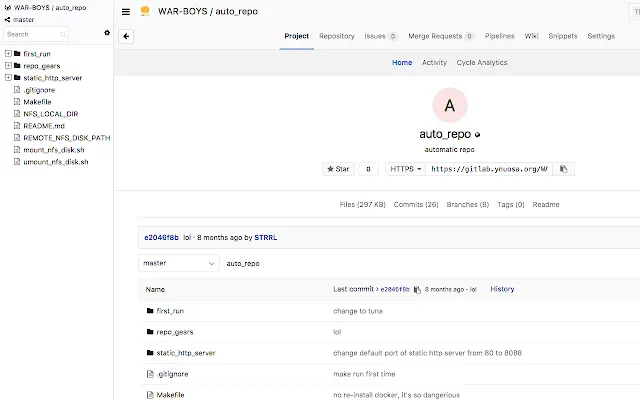
- Visual Code Tree Integration – Displays a collapsible file tree directly on the GitLab interface, allowing users to browse repository structure visually instead of relying on a flat list.
- Quick File Preview – Enables users to preview file content without leaving the current page, reducing context switching during code reviews or debugging.
- GitLab UI Style Compliance – Matches the look and feel of GitLab’s native interface, ensuring a seamless user experience without visual disruption.
- File Search Functionality – Allows users to search for files by name across the repository, speeding up the process of locating specific files.
- GitLab API Compatibility Fix – Addresses known issues with GitLab’s API in older versions, particularly 9.x, improving reliability and reducing load failures.
These features are especially beneficial during code reviews, where developers need to quickly locate related files or understand project structure. The visual tree simplifies navigation in large repositories, while the search function enhances precision. The preview feature supports faster decision-making by allowing immediate access to file content.
User Interface, Workflow & Performance
The extension integrates directly into the GitLab web interface, adding a sidebar or inline panel with the code tree. The UI is minimal and designed to align with GitLab’s visual language, minimizing distraction. Navigation is intuitive: users can expand folders, click files to open them, and use the search bar to filter results dynamically.
Workflow efficiency is improved by reducing the number of clicks required to access files. Instead of navigating through multiple pages or scrolling through long lists, users can drill down into directories with a few clicks. The extension does not alter the core GitLab interface, preserving functionality while enhancing usability.
Performance observations are based on general software behavior patterns. The developer did not specify resource usage details. No reported issues with stability were mentioned. CPU and RAM behavior were not disclosed. The extension operates within the browser environment, and performance may vary depending on the size of the repository and the user’s system configuration.
Compatibility & System Requirements
The extension is compatible with Windows, Mac, and Linux operating systems. It is designed for use with the Chrome browser, as it is a Chrome extension. The software version is 1.0.0, with a file size of 1.4 MB, indicating a lightweight installation.
Exact system requirements were not listed. The extension supports GitLab 9.x versions, which suggests it may work with older installations but may not be optimized for newer versions. Platform compatibility information is limited to the operating systems and browser specified. No additional hardware or software prerequisites were provided.
Pros and Cons
Pros
- Lightweight at 1.4 MB, minimal impact on browser performance
- Enhances code navigation with a visual file tree
- Supports GitLab 9.x, useful for legacy installations
- Quick file preview reduces context switching
- Matches GitLab’s native UI style for seamless integration
Cons
- Support limited to GitLab 9.x, may not work with newer versions
- No official documentation or user guides provided
- Developer background and support channels not disclosed
- Performance under large repositories not verified
- Only available for Chrome, no other browser support mentioned
FAQ Section
Is the extension compatible with all GitLab versions?
The extension is confirmed to support GitLab 9.x versions. Compatibility with newer or older versions was not specified.
Can I use this extension offline?
As a browser extension, it requires an active connection to GitLab and the Chrome browser. Offline usage is not supported.
Is the extension secure to install?
The extension is available through official Chrome Web Store channels and does not require elevated permissions. No security risks were reported.
How often are updates released?
Update frequency was not specified. The current version is 1.0.0, and no changelog or release history was provided.
What browsers are supported?
Support is confirmed for Chrome. No information was provided about compatibility with other browsers.
Final Thoughts
The GitLab Code Tree extension for Chrome offers a focused, lightweight solution for developers who need faster code navigation within GitLab repositories. Its visual tree, search function, and quick preview features significantly improve workflow efficiency, especially in complex projects. While its support is limited to GitLab 9.x, it fills a valuable niche for teams still using older installations.
Despite the lack of detailed documentation and support information, the extension delivers on its core promise: better file visibility and access. It is ideal for software engineers, DevOps contributors, and technical reviewers who spend significant time navigating GitLab repositories.
Download GitLab Code Tree Extension now







